
Saving up for your tax bill throughout the year can make it much easier to manage your finances. HMRC offers a Budget Payment Plan that allows you to make regular voluntary payments towards your next tax bill, spreading the cost and avoiding a large lump sum payment.
What Is a Budget Payment Plan?
A Budget Payment Plan is a voluntary Direct Debit arrangement that allows you to save money towards your Self Assessment tax bill throughout the year. You choose how much and how often to pay, and HMRC holds the money until your tax bill is due.
Key features:
- Pay weekly or monthly – you decide the frequency
- Set your own payment amount – pay as much or as little as you can afford
- Change or cancel at any time – complete flexibility
- Automatic payments via Direct Debit
- Payments are applied to your account when your tax bill is calculated
Who Should Use a Budget Payment Plan?
Budget Payment Plans are particularly useful if you:
- Find it difficult to save a lump sum for your January tax bill
- Have variable self-employment income throughout the year
- Want to spread the cost of your tax bill over 12 months
- Prefer regular automatic payments rather than manual saving
- Previously struggled to pay your tax bill on time
- Want peace of mind that you’re saving towards your tax liability
How Much Should You Pay?
You can pay any amount you choose, but here are some guidelines:
- Look at last year’s tax bill: A good starting point is to divide last year’s total tax liability by 12 months
- Account for changes: If your income has increased, consider paying more; if it’s decreased, you might pay less
- Include payments on account: Remember that your January payment includes not just the balance for the previous year but also the first payment on account for the current year
- Start small: Even £50-100 per month is better than nothing and can significantly reduce the burden
Example: If your total tax bill last year was £3,600, you could set up a Budget Payment Plan for £300 per month to cover the full amount over 12 months.
How to Set Up a Budget Payment Plan
Follow these steps to set up your Budget Payment Plan online:
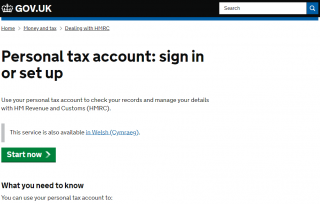
Step 1: Log In to Your Personal Tax Account
Go to https://www.gov.uk/personal-tax-account and sign in using your Government Gateway user ID and password.
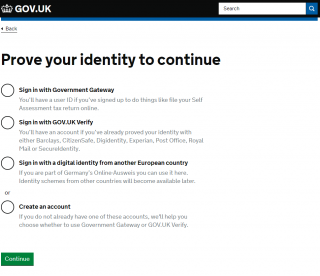
Step 2: Complete Two-Factor Authentication
Verify your identity using one of the methods listed (typically a code sent to your mobile phone or authentication app).
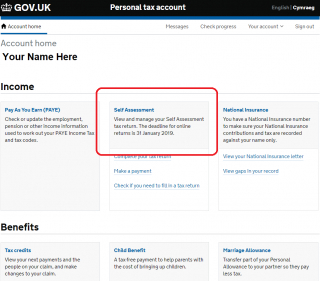
Step 3: Navigate to Self Assessment
Once logged in, select “Self Assessment” from your account home page.
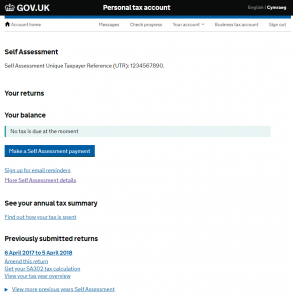
Step 4: Access More Self Assessment Details
On the Self Assessment screen, choose “More Self Assessment details” (shown in purple text).
Step 5: Select Direct Debit Payments
Look for “Set up a budget payment plan” or “Direct Debit payments” in the menu options on the right-hand side.
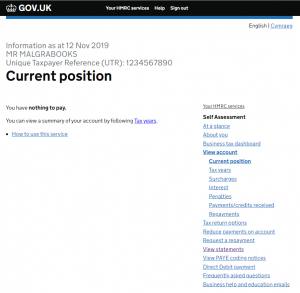
Step 6: Complete the Setup Form
You’ll be presented with a form where you’ll need to provide:
- Payment amount: How much you want to pay each time
- Payment frequency: Weekly or monthly
- Bank details: Your account number and sort code for the Direct Debit
- Start date: When you want the first payment to be taken
Step 7: Confirmation
Once you submit the form, HMRC will send you a letter confirming your Budget Payment Plan setup, including:
- Your payment amount and frequency
- The date payments will be collected
- Your Direct Debit guarantee details
- How to make changes or cancel
Your first payment will be taken on the date you specified.
Managing Your Budget Payment Plan
Changing Your Payments
You can change the amount or frequency of your payments at any time:
- Online: Log in to your Personal Tax Account and update your Direct Debit instruction
- By phone: Call the HMRC Self Assessment Payment Helpline on 0300 200 3835
Changes typically take effect from your next scheduled payment.
Cancelling Your Plan
You can cancel your Budget Payment Plan at any time:
- Any money already paid will stay on your account and be applied to your next tax bill
- You won’t lose any payments you’ve already made
- You can restart the plan later if needed
Checking Your Balance
You can view how much you’ve saved through your Budget Payment Plan by:
- Logging into your Personal Tax Account
- Going to Self Assessment
- Viewing “More Self Assessment details”
- Checking your account balance
Your payments will show as a credit on your account.
What Happens When Your Tax Bill Is Due?
When you submit your Self Assessment tax return and your tax bill is calculated:
- HMRC automatically applies the money from your Budget Payment Plan to your tax bill
- You only need to pay the remaining balance (if any)
- If you’ve overpaid, you can request a refund or leave the credit on your account for next year
- You’ll see the applied payments on your Self Assessment statement
Important Things to Know
Direct Debit Guarantee
Your payments are protected by the Direct Debit Guarantee, which means:
- You’ll be notified in advance of payment amounts and dates
- You can cancel at any time
- If there’s an error, you’re entitled to an immediate refund from your bank
Minimum Payment
There’s typically a minimum payment amount of £10 per week or £30 per month, though this may vary.
No Interest Paid
HMRC does not pay interest on Budget Payment Plan balances. This is a savings mechanism, not a savings account.
Payment Timing
Allow 5-7 working days for your payment to show on your HMRC account after it’s been taken from your bank.
Failed Payments
If a Direct Debit payment fails:
- HMRC will notify you
- Your Budget Payment Plan may be cancelled
- Any money already paid remains on your account
- You’ll need to set up a new plan if you want to continue
Benefits of Using a Budget Payment Plan
- ✅ Spreads the cost – Makes tax bills more manageable
- ✅ Automatic – Set it up once and forget about it
- ✅ Flexible – Change or cancel at any time
- ✅ No penalties – Voluntary scheme with no downsides
- ✅ Peace of mind – Know you’re saving towards your tax bill
- ✅ Avoid debt – Prevents needing Time to Pay arrangements later
- ✅ Better budgeting – Helps with cash flow management
Alternative Ways to Save for Your Tax Bill
If a Budget Payment Plan doesn’t suit you, consider these alternatives:
- Separate savings account: Set up a dedicated account for tax savings and transfer money regularly
- Standing order: Set up a standing order to transfer money into savings on the day you get paid
- Percentage method: Save a percentage of every payment you receive (e.g., 20-30% for self-employed income)
- Use MalgraBooks tools: Track your estimated tax liability throughout the year in your spreadsheet
Common Questions
Can I Set Up a Budget Payment Plan If I Owe Tax?
Yes, but you should prioritize paying any outstanding tax debt first. Budget Payment Plans are for future bills, not existing debts.
What If I Pay Too Much?
If your Budget Payment Plan contributions exceed your final tax bill, you can:
- Request a refund of the overpayment
- Leave the credit on your account for next year’s tax bill
- Continue making payments to build up a balance for future years
Can I Make One-Off Payments Too?
Yes, you can make additional one-off payments towards your tax bill at any time, separate from your Budget Payment Plan. These can be made via:
- Online or telephone banking
- Debit or credit card through HMRC’s website
- At your bank or building society
Does This Affect My Payments on Account?
No, Budget Payment Plan contributions are separate from the official payments on account system. However, any money you save through the plan can be used to pay your payments on account when they’re due.
Need Help?
If you need assistance setting up or managing your Budget Payment Plan:
- HMRC Self Assessment Payment Helpline: 0300 200 3835
- Online help: https://www.gov.uk/pay-self-assessment-tax-bill
Key Takeaways
- Budget Payment Plans make tax bills easier to manage by spreading payments throughout the year
- You have complete flexibility to set, change, or cancel payments
- Payments are automatic via Direct Debit
- Money is automatically applied to your tax bill when it’s calculated
- There’s no penalty for overpaying – you can get a refund or keep the credit for next year
- This is different from Time to Pay – Budget Plans are voluntary advance payments