
Our reports are designed to help you get closer to your business data, and provide detailed tables and calculations to show your performance over time.
You can locate your report on your Business Dashboard in the Reports folder.
Introuduction
The first few pages introduce your report, and explain the different sections. The report is split into the below headings
- Profit and Loss Statement: This provides a breakdown of all information which has been provided to our team, headlined into specific sections of Income and Expenses, along with brief overall calculations of profit/loss and taxation expected to be due.
- Estimated Tax Calculation: An overview of your current tax calculation. This is based on current HMRC Guidance and may change subject to any further income through the year, any income from other sources (such as employment or pensions) or details which HMRC may hold for you.
This is designed to be a ‘rough’ calculation and therefore may change. The final confirmation based on information we’ve received and processed for you will appear on your SA302 Tax Calculation which is issued before we submit the return for you. - Making Tax Digital Calculations: An overview of your Making Tax Digital (MTD) calculations is provided here. This is usually a summary value of totals for each MTD Quarter. You can view final figures for these within your Member Dashboard on the MalgraBooks website.
- Data Sources: This section provides a full breakdown of all information we’ve received to date for you. This allows you to check and verify any details. It begins with PFS Documents and then is split into two main areas of Income (such as Stock Commission, Shop Sales, Team Developer income (if applicable) and then Expenses (such as SW Net Fees (Franchise Fees), Rent, Mileage and then general expenses)
Profit and Loss Statement
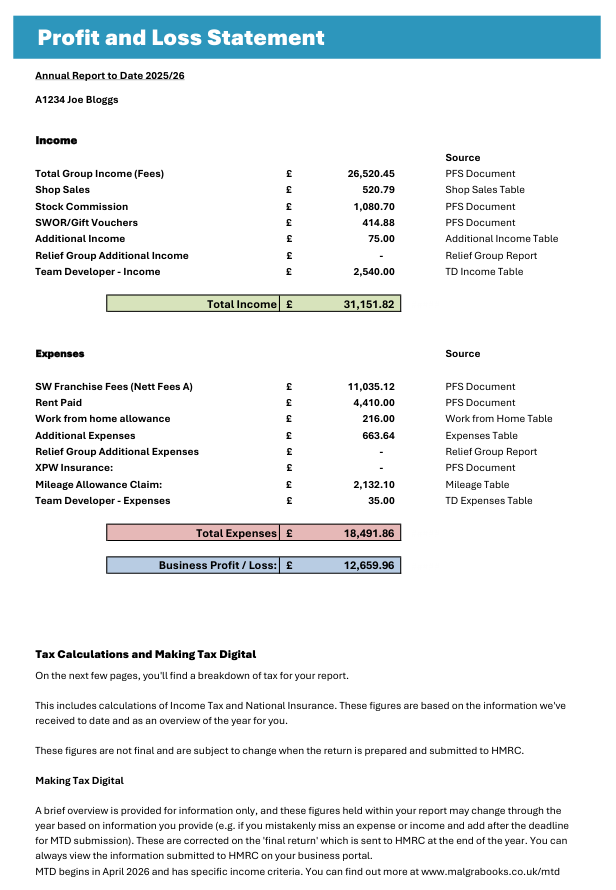
This simple summary provides an overview of your entire business with all details provided to our team. In this example, total income (green box) is showing as £31,151.82 and the summary above this explains where this value has been obtained from. You can then see on the right which table / page to refer to for further details.
The expenses are also listed, with references to the source data.
Finally, an overall profit/loss value is shown. This is used for taxation.
Estimated Tax Calculation
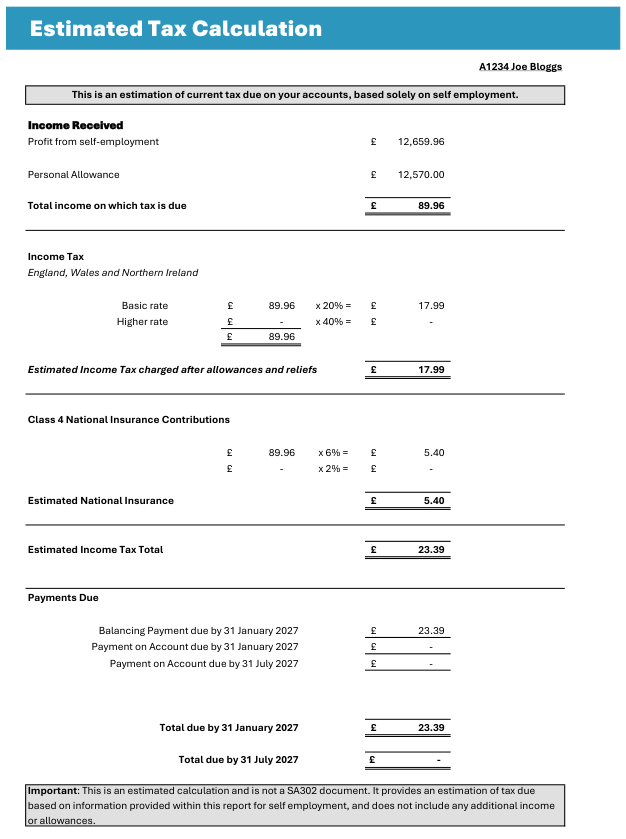
This is an estimate of what tax would be applied right now, if there is no further data to consider. This breaks down the overall profit, and how much tax and national insurance would be due ton the balance.
If you have other employment, or self employment income, this will not appear on this page, and therefore the calculations may not be accurate.
Making Tax Digital Summary
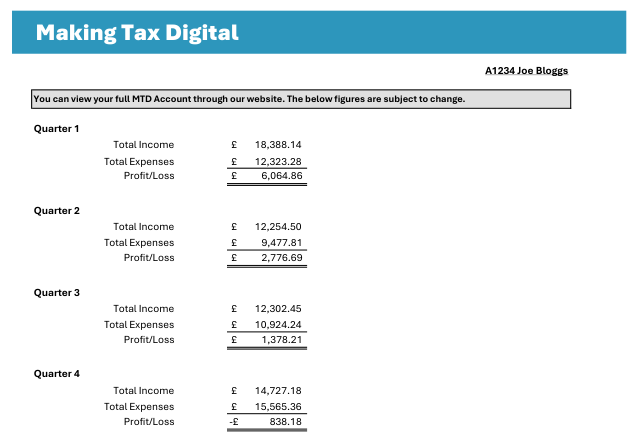
A short summary of MTD Quarters are shown on the Making Tax Digital page. These are summary values, and the actual ones can be viewed through your member dashboard.
Plan for Success Documents
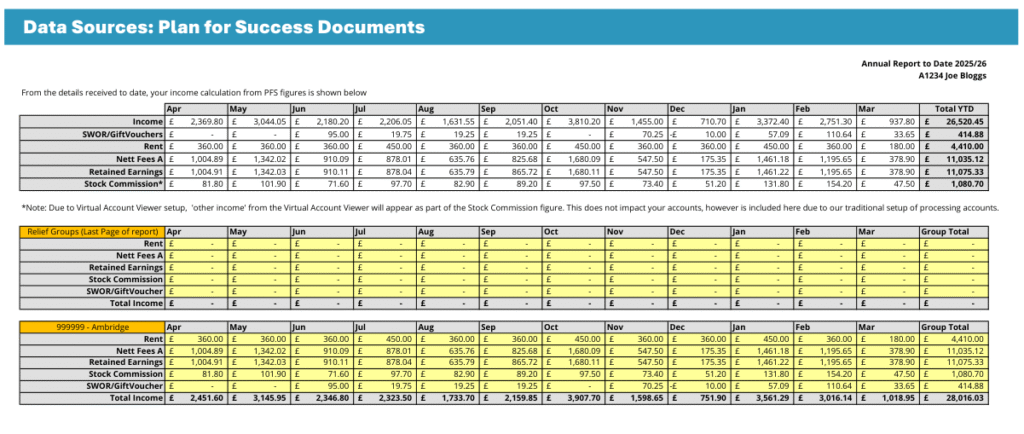
This screen shows the total PFS Document income which has been logged for you. If a period is missing, you can submit the documents to our team for processing.
An overall running total is provided across the top of the screen.
Data Sources
The following screens break down the data further, including calculations of rent, stock commission and sundries.